

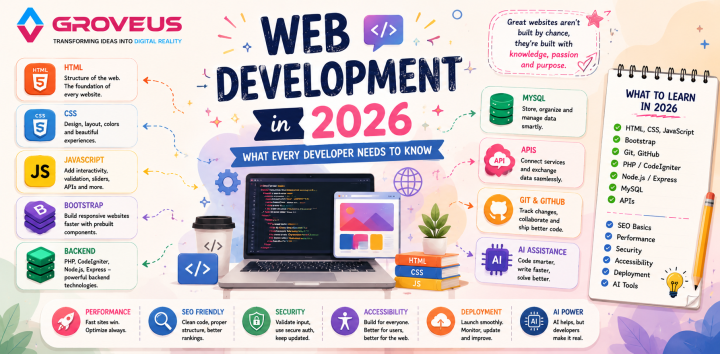
Explore the essentials of web development in 2026, from HTML, CSS and JavaScript to APIs, Git, AI, SEO, security, accessibility and website performance.
There is constant change in web development. New frameworks appear, libraries are updated, and AI enters the development process. Sometimes it feels like there is always something else to learn.
However, when I develop a website, I start with understanding what it needs to do.
First, I analyzed the project.
What functions does the website need to perform? Who is the target audience? Does it require a database? Are the majority of the visitors using mobile phones? Does the client need an admin panel? Usually, these questions help me to understand which technologies are relevant.
That is why I believe fundamentals still play an important role in 2026.
HTML, CSS, and JavaScript Are Relevant
For me, HTML, CSS, and JavaScript are the starting points.
HTML defines the page structure. I use it for sections, headings, images, forms, navigation, and other types of content.
CSS is responsible for the design. That is the spacing, colors, font, layouts, buttons, and responsiveness.
JavaScript is needed for interactions. Menu, slider, popup, form validation, and API request require JavaScript.
Sometimes it is tempting to move straight to the framework. However, there are many frameworks that are popular now.
Still, I believe that if the basics are poor, frameworks won't solve the problem. I would prefer to learn HTML, CSS, and JavaScript before the framework.
Do Not Build a Website Only for Desktop
Something I check while developing is how the website works on mobile devices.
It is possible that a website works perfectly fine on the desktop and has problems on mobile. The navigation may not fit, buttons can become too small, and large headings can take too much space.
Mobile responsiveness should be considered when developing the website.
Sometimes the desktop layout has to be changed for the mobile. The row of cards can be transformed into a column. The large navigation can become a menu button. Spacing may need to be changed.
The goal is not to make a website smaller, but easy-to-use on mobile.
Bootstrap Can Make Development Faster
Bootstrap is something I use in a project if it is relevant for it.
Grid systems and components can save time while developing responsive designs, buttons, cards, forms, modals, and navigation.
It is especially useful if the website needs to be developed fast.
However, I do not see Bootstrap as something that can replace CSS knowledge. If you understand CSS, you can customize Bootstrap components.
For me, Bootstrap is a tool for fast development, not a way to stop learning how websites are actually built.
Backend Develops a Website into the Application
Frontend can display information, but sometimes a website has to do more.
Contact form may require saving the inquiries. A business website may need an admin panel. Web applications can require users' accounts and information from the database.
In this case, backend development is needed.
PHP, CodeIgniter, Node.js, and Express are the technologies that can be used for that.
Also, I consider the structure of the project. In CodeIgniter, the MVC pattern divides the Model, View, and Controller. Such a structure of the project is convenient for developing the additional features.
This becomes especially important if the small website turns into the web application.
MySQL Provides Storage for Information
Most dynamic websites need a database.
Databases can contain the contact inquiries, users, services, locations, blog posts, orders, and other information.
MySQL is the technology that is usually used for that purpose.
Database structure is more important than it seems at first. Messy storage of information can cause problems if it needs to be changed later.
Developers should know basic operations with databases: creation, reading, update, and deletion of the data. Relations between tables can become an issue in a large project.
APIs Connect Various Services
Websites often require information from other systems.
For example, it can be a map service, payment gateway, email service, or authentication system.
APIs provide communication between various services.
While working with APIs, I usually have to think about data to send, response received, and what to do if something goes wrong.
GET, POST, PUT, PATCH, and DELETE are the HTTP methods that I use often. JSON is also a format used for data exchange.
After understanding the basic process of request and response, API integration becomes much easier.
Git Is More Useful Than It First Appears
I found Git much more useful after working on larger projects.
Imagine making some changes to the code and finding out that something that was working earlier stopped working.
With Git, you have the history of these changes.
Branches are useful if you develop a new feature. You can work in a branch and merge your changes once they are ready.
GitHub makes it easier to store repositories and collaborate with other developers.
Even while working on the personal projects, I believe it is worth learning Git.
AI Changes How Developers Work
Nowadays AI is another tool in the developer's toolkit.
It can help to explain errors, suggest code, generate examples, write documentation, and propose different approaches to a problem.
This can save some time.
However, I do not think that it is necessary to copy the code generated by AI blindly.
Code can look correct and still have a bug. Generated code can be inconvenient to use with the existing project, or it can bring security issues.
That is why I believe that it is not enough just to know how to use AI. Developers should also know how to check the answers provided by it.
AI can help with the work, but developers should understand the code he is using.
The Website Has to Be Fast
It is possible that a website will be slow even if it is not complicated.
Large images, unnecessary scripts, too many external resources, and poorly optimized code can be the reason for it.
I usually analyze things such as image size, unnecessary JavaScript, and resources that are loaded on the page.
It is important to have a good design, but users also expect fast performance.
There is no point in making a beautiful website if people leave before it loads.
SEO Is Also Related to Development
SEO is not only about keywords and blog posts.
The way how the website is built can affect how it will be understood by the search engines.
Such things as semantic HTML, heading hierarchy, page title, meta description, clean URL, image alt text, and mobile responsiveness are important for good search engine optimization.
A developer doesn't have to become an SEO specialist, but basic knowledge of technical SEO can be useful when developing websites that should perform well in search engines.
Do Not Forget About the Security
Security is another aspect that should be considered while developing the website.
Websites can handle passwords, contact information, customers' details, and other data. SQL injection, cross-site scripting, and weak authentication can become real problems.
Basic practices include input validation, secure authentication, and keeping dependencies updated.
I think it is easier to manage security when it is considered from the very beginning of development.
Accessibility Is Also Important
Websites should be usable for as many people as possible.
Some people navigate with the keyboard. Other people may use screen readers or different assistive technologies.
It is possible to improve accessibility using proper HTML elements, labels to forms, useful alt text, and keyboard-friendly navigation.
These details are not evident while analyzing the finished design, but they can make a real difference for users.
What Should a Developer Learn in 2026?
It is not necessary to learn everything that exists.
Practical approach can be:
HTML - CSS - JavaScript
Bootstrap - Git - GitHub
PHP / CodeIgniter - Node.js / Express - MySQL - APIs
Together with these technologies, I would also learn the basics of:
SEO - Performance - Security - Accessibility - Deployment - AI
Order can be slightly different for everybody.
Your learning path may differ from the path of the person who develops business websites.
The most important thing is understanding why you need a particular technology.
You Do Not Have to Follow Every Trend
I think this is one of the hardest things for new developers.
There is always a new framework.
Then a library.
And then another tool that is widely discussed.
Trying to learn all of them can become exhausting.
My preference is learning a technology when I have a reason to use it. When a project requires a particular framework, library, or API, it is a great opportunity to learn it.
Strong fundamentals also make it easier.
If you understand HTML, CSS, JavaScript, databases, APIs, and HTTP, learning a new framework is not so hard.
Tools are changing, but the basic concepts are not changing so fast.
Conclusion
Web development in 2026 is not just about the latest framework.
The developer has to think about the whole website.
Does it work properly?
Does it look good on mobile devices?
Does it load fast?
Can users find the information they need?
Is the website secure?
Do search engines understand the content?
These questions are as important as the code itself.
HTML, CSS, and JavaScript are the solid foundation. Bootstrap speeds up frontend development, PHP, CodeIgniter, Node.js, and Express are used for backend. MySQL provides database management, APIs connect various services, and Git allows managing the project.
AI is another useful tool, but it does not remove the necessity to understand what you are developing.
For me, good web development is not about using as many technologies as possible. It is about choosing the right technologies and using them properly.
Comments 0